5 November 2026
What logo file do I need for an engraved corporate gift?
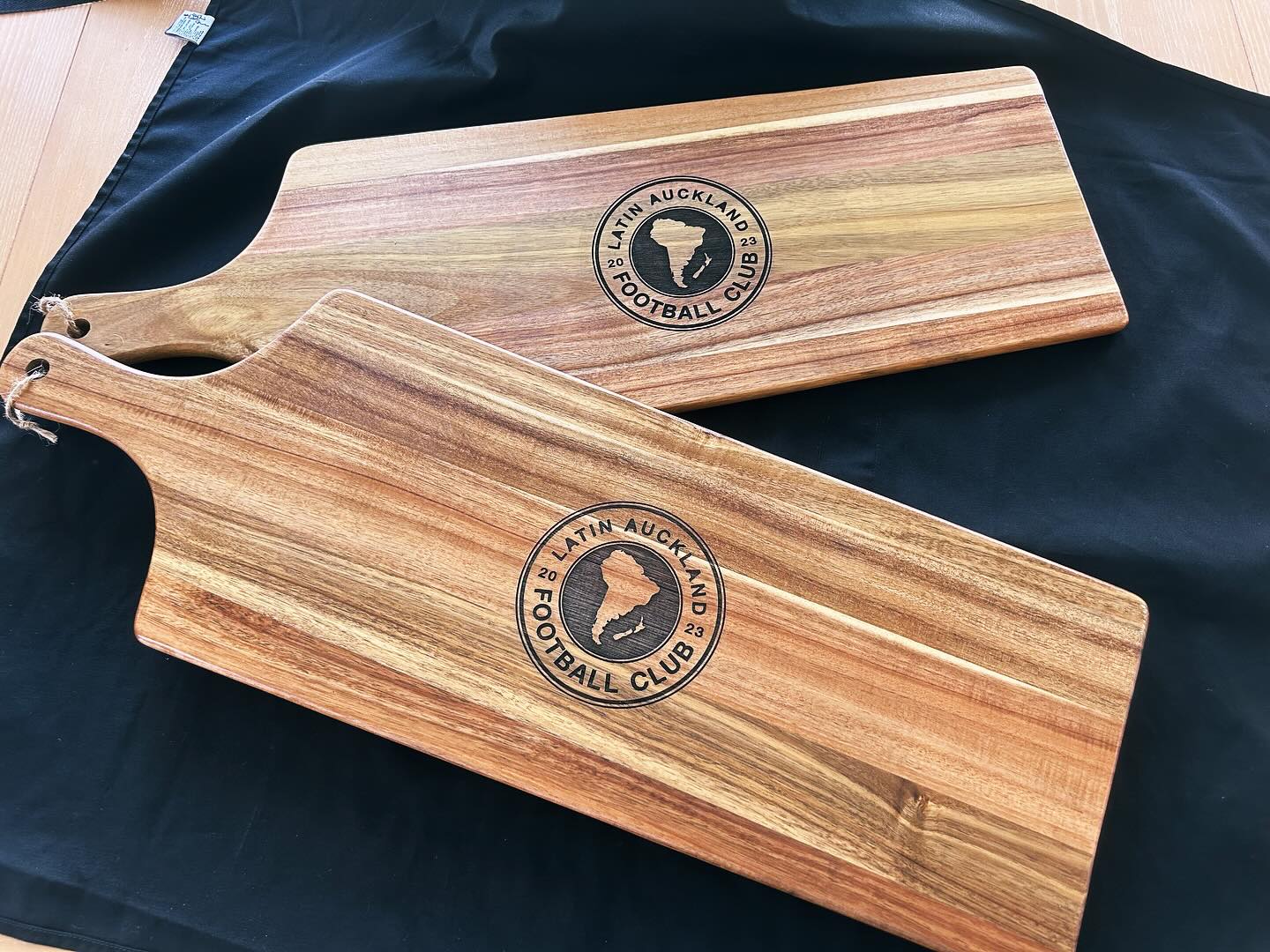
For a logo engraved on a wooden board, send a vector file: AI, EPS, SVG, or a PDF exported from design software. If all you have is a PNG, send the largest version you can find and we will check it before we make anything.
What file type is best for logo engraving?
A vector file gives the cleanest result. Our corporate board accepts AI, EPS, PDF, SVG and PNG uploads, and the first four are the formats we ask for when you have them.
Vector files store a logo as shapes and lines rather than as a grid of pixels. That means we can scale the logo up or down to fit the board and the edges stay sharp. The file types to look for:
- AI is an Adobe Illustrator file, the format many designers work in.
- EPS is an older vector format that many print and signage suppliers still use.
- SVG is a vector format often used on websites.
- PDF can hold vector artwork, so a PDF exported from Illustrator or a similar program usually works well.
One catch with PDFs: a PDF can also just hold a photo or a scan. If your PDF came from a scanner or someone saved a screenshot as a PDF, it will behave like a pixel image.
What if I only have a PNG of my logo?
You can still upload it. Send the highest resolution PNG you have and we will review it. A small PNG copied from a website or an email signature often looks fine on screen but goes soft or jagged when it is enlarged to fit a board.
If a file needs redrawing before we can engrave it, extra artwork preparation charges may apply.
Before settling for a PNG, have a look for the original. The person or agency who designed your logo will usually have the vector master. Your printer or signage supplier may also have a copy. The upload takes files up to 50 MB.
Will my logo's colours show up?
No. Engraving works in tone and texture, so your logo comes out as a darker mark on the natural timber rather than in your brand colours.
The logos that need a little thought are ones where two parts are only told apart by colour, for example a blue word next to a green word. In tone, those two parts will look much the same. If you have a one-colour version of your logo, often called a mono or black version, send that as well, because it shows us how the logo is meant to look without colour.
Very fine detail is the other thing to check. A thin tagline or small print under a logo may be too small to read clearly once the logo is sized for the board, especially on a smaller piece such as a coaster.
Should I choose a logo or a QR code?
Our corporate board comes in two set designs, one built around your logo and one built around a QR code. Choose the logo design if the board is a thank-you or a keepsake. Choose the QR code if you want people to scan through to a website, a menu, a review page or a booking link.
For a QR code, you give us the link it should open, up to 200 characters. Because the code is engraved into timber, it cannot be changed later, so:
- Use a link you control and expect to keep live, such as your own homepage, rather than a short-term campaign page.
- Open the link yourself on your phone before you order, to check it goes where you expect.
- Check the QR code on your proof with your phone camera before you approve it.
What else can I add to a corporate board?
As well as the logo or QR code, the corporate board has room for your company name or other text (up to 60 characters), a short message (up to 140 characters) and a line saying who the gift is from (up to 60 characters). You also choose a lettering style from ten options, including Classic Serif, Modern Sans, Bold Block and Minimal Caps. If your brand uses a particular typeface, choose the style closest to it in feel.
When you upload a logo, the form asks you to confirm you have the right to use it, so if a gift carries a client's logo, check with them first.
How do I order corporate gifts in bulk?
For a single board, you can order straight from the shop. For a larger run, or anything that needs a quote, use our contact form and choose "A business order" or "A bulk order". Tell us how many boards you need, which board, and the date you need them by. Some bulk and corporate pieces are quoted on enquiry rather than priced on the page.
Corporate boards come in five types, from $65 for a circle board with knives to $95 for a slate board with knives. You can pay by card, including Apple Pay and Google Pay, or ask for an invoice on a corporate order. An invoiced order starts once it is paid, so allow for that if you are working to a date.
If the boards are for Christmas or end-of-year client gifts, put your date on the enquiry and we will tell you whether we can have them made in time. Boards can be collected from Hobsonville, delivered locally, or shipped anywhere in New Zealand, and delivery time is on top of the time it takes to make them.
We send you a proof before we make anything, showing your logo, wording and layout on the board. You can start with the corporate board, or get in touch if you would like a quote for a larger order.
Quick answers
What logo file should I send for engraving?
A vector file: AI, EPS, SVG, or a PDF exported from design software. These scale to any size without losing sharpness.
Can I send a PNG instead?
Yes. Send the highest resolution PNG you have and we will review it. If it needs redrawing, extra artwork preparation charges may apply.
Can you engrave my logo in colour?
No. Engraving shows as tone on the timber, so a one-colour version of your logo is the best guide for how it will look.
Can I order several branded boards at once?
Yes. Use the contact form, choose "A bulk order", and tell us the quantity, size and date you need them by.